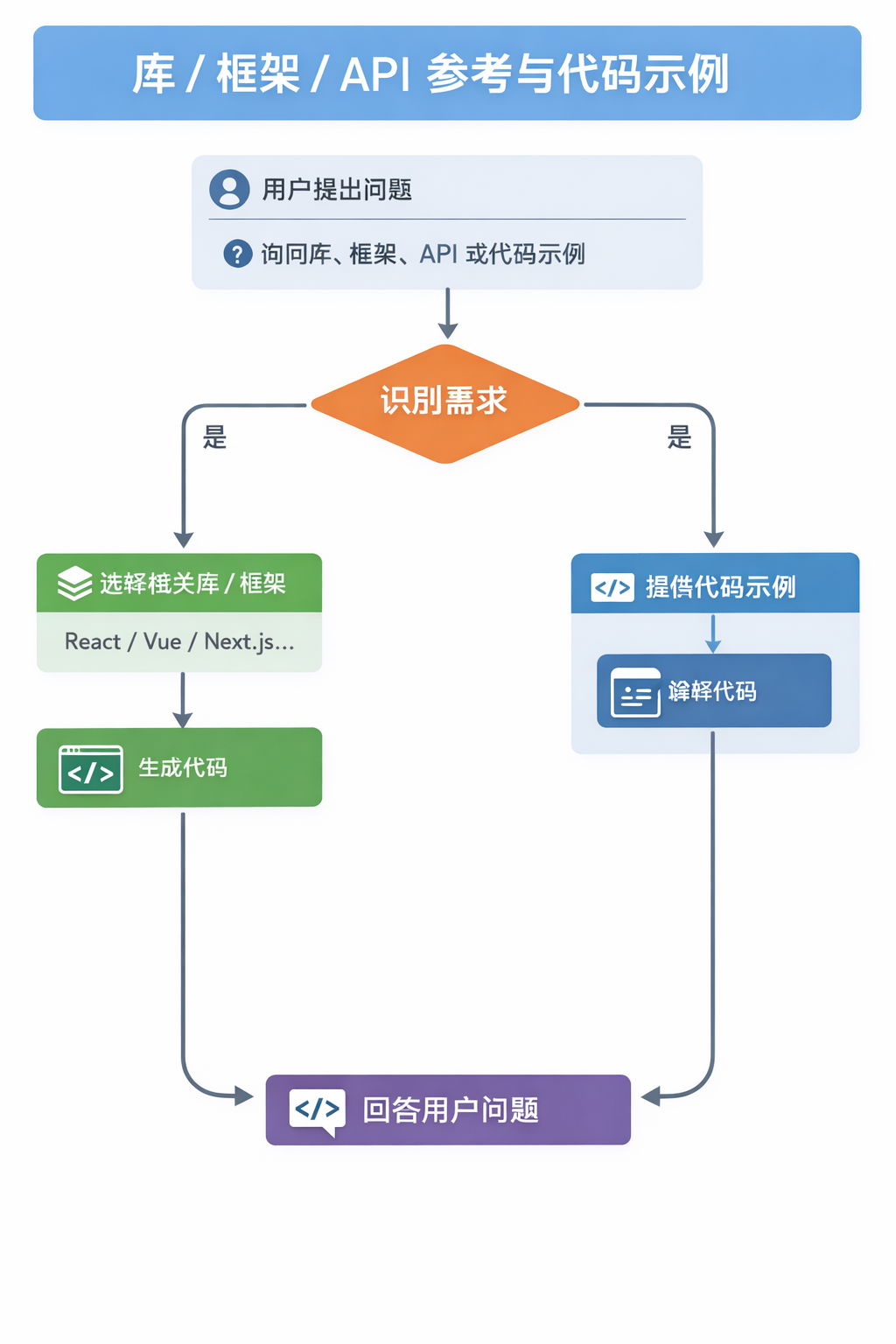
This skill should be used when the user asks about libraries, frameworks, API references, or needs code examples. Activates for setup questions, code generation involving libraries, or mentions of specific frameworks like React, Vue, Next.js, Prisma, Supabase, etc.
Full Sentry SDK setup for Mini Programs — error monitoring, tracing, offline cache, source maps. Supports WeChat, Alipay, ByteDance, Baidu, QQ, DingTalk, Kuaishou and cross-platform frameworks (Taro / uni-app).
Create uncontested market space using value innovation instead of competing head-to-head. Use when the user mentions "blue ocean", "red ocean", "strategy canvas", "ERRC framework", "value innovation", or "non-customers". Covers the Four Actions Framework, buyer utility map, and value-cost trade-offs. For tech adoption strategy, see crossing-the-chasm. For product positioning, see obviously-awesome.
Solve problems using knowledge base insights - extracts search terms, runs parallel KB queries, synthesizes advice grounded in your own frameworks
- Exploring the runpod-flash framework codebase
- 📁 examples/
- 📁 reference/
- 📄 SKILL.md
Develop and maintain the SimpleLLMFunc framework itself. Use when changing framework internals, tests, docs, specs, runtime primitives, decorator behavior, tool plumbing, event streams, PyRepl integration, or contributor-facing project structure and conventions.
- 📁 assets/
- 📁 references/
- 📁 scripts/
- 📄 SKILL.md
Analyzes and improves prompts using 27 research-backed frameworks across 7 intent categories. Use when a user wants to improve, rewrite, structure, or engineer a prompt — including requests like "help me write a better prompt", "improve this prompt", "what framework should I use", "make this prompt more effective", or any prompt engineering task. Recommends the right framework based on intent (create, transform, reason, critique, recover, clarify, agentic), asks targeted questions, and delivers a structured, high-quality result.
- 📁 .github/
- 📁 agents/
- 📁 commands/
- 📄 .gitignore
- 📄 CHANGELOG.md
- 📄 LICENSE
Multi-agent orchestration framework for Claude Code. Automatically delegates tasks to cheaper, faster sub-agents (Haiku 4.5, Sonnet 4.6) while maintaining Opus-level quality through verification. Use when working on any coding task — Hydra activates automatically to route file exploration, test running, documentation, code writing, debugging, security scanning, and git operations to the optimal agent. Saves ~50% on API costs. --- # 🐉 Hydra — Multi-Headed Speculative Execution > *"Cut off one head, two more shall take its place."* > Except here — every head is doing your work faster and cheaper. ## ⛔ MANDATORY PROTOCOLS — NEVER SKIP These protocols are NON-NEGOTIABLE. Skipping them is a framework violation. ### Protocol 1: Sentinel Scan After Code Changes When ANY agent returns output containing `⚠️ HYDRA_SENTINEL_REQUIRED`, you MUST — before doing ANYTHING else, before presenting results to the user, before running any other agents — dispatch hydra-sentinel-scan with the files and changes listed in the trigger block. **This is blocking.** The user does NOT see the code changes until sentinel completes. If you present code changes to the user without running sentinel first, you have violated the framework's core safety guarantee.
Use when the user asks to analyze a project, understand the tech stack, detect frameworks, check what languages are used, identify runtimes or package managers, or as a first step before security/vulnerability scans
- 📁 references/
- 📄 SKILL.md
- 📄 SYNC.md
This skill teaches AI coding agents how to use the ACCESSIBILITY.md framework,
Step-by-step guide to add a new discord.py Cog to the framework
- 📄 7Dkb.md
- 📄 ide-rules-format.md
- 📄 levels-overview.md
**SevenD — 7D Framework Full Lifecycle Skill**: Scaffolds, customizes, deploys, and operates the 7D development framework for any project. Covers initial setup (assess → customize → deploy), ongoing operations (sprint management, feature workflow, agent debugging), and level upgrades. Make sure to use this skill whenever the user mentions 7D, SevenD, project setup for AI agents, framework levels, sprint reviews, feature workflows, or wants help structuring any project for AI-assisted development. - MANDATORY TRIGGERS: 7D, SevenD, seven D, framework setup, project setup, scaffold project, project structure, set up my project, start a new project, project template, configure framework, upgrade level, GitHub setup, sprint setup, IDE rules setup, sprint review, new feature workflow, agent not following rules, framework feels heavy, framework feels light - Also trigger when: user wants to organize a project for AI-assisted development, wants to set up Cursor/Windsurf/Claude Code/Copilot rules, wants to migrate between framework levels, wants help running a sprint review, wants to add a feature through the full 7D workflow, wants to debug why an AI agent isn't following framework rules, or asks how to structure any project so AI agents can work effectively — even non-software projects --- # SevenD — 7D Framework Skill


